Table of Contents (Click to expand)
Product introduction
JAKCOM R5 is a multifunctional smart ring that can replace 6 proximity RFID cards simultaneously, interact with mobile phones to realize special functions of "Social Sharing", "Wireless USB Flash Disk", "Shortcut" and features scratch-resistant, waterproof, and dustproof hardware characteristics.
Packing List

Specification Parameters
NFC Phones applicable: All Android phones with NFC function, as well as iPhone launched after September 2018, such as iPhone XR, XS, 11, 12, 13, 14, 15, 16, 17 and 18, etc.
Structure and Sensing Range
A. The area engraved with "I" is No.1 IC card
B. The area engraved with "II" is No.1 NFC card
C. The area engraved with "III" is No.2 IC card
D. The area engraved with "IIII" is No.2 NFC card

E. The white side area is No.1 ID card
F. The black side area is No.2 ID card
G. Health energy stone 1
H. Health energy stone 2

Reading method of IC and ID module
The reading method of any IC or ID module is the same as an ordinary card,
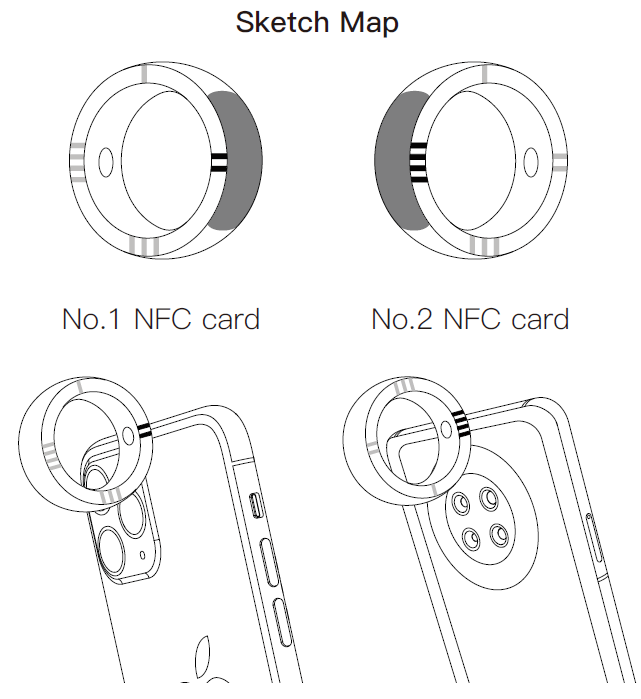
Close to the card reader according to the sensing range shown in the figure above.
Sketch Map:
Use No. 1 IC card
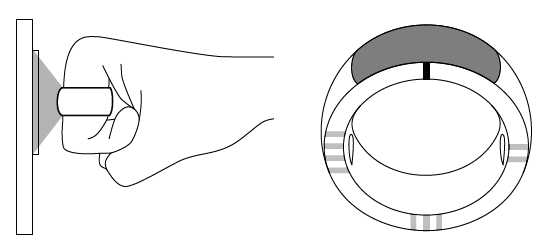
Use No. 2 IC card
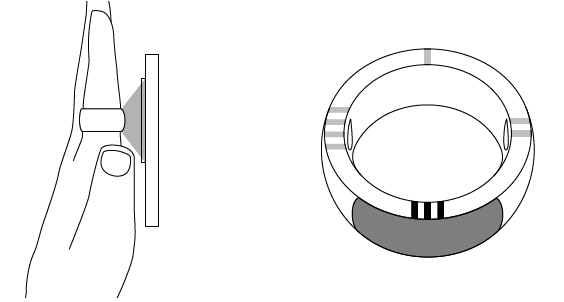
Use No. 1 ID card

Use No. 2 ID card

Tip: The antenna of each module shall be close to the card reader, The closer the distance, the more sensitive the reader will be.
Setting method of IC and ID module
Adding the ring as a new card:
Any IC or ID module of the ring can be regarded as a new blank card, and the setup method is the same as that of a regular card.
You can go to the card issuing party (e.g., property management) and ask them to treat the ring as a blank new card, following the process for adding a new card to include the ring in the system.
Household fingerprint locks come with a manual that includes instructions on how to add new card keys. Just treat the ring as a new card and add it according to the corresponding instructions.
Using a mobile phone to copy the original card to the ring:
For non-encrypted IC cards, you can copy them using the "Copy Key Card" function in this product's APP. (App download link can be found in the next section)
Using a replicator to copy the original card to the ring:
If it is an encrypted IC card, you can use any replicator to decode and replicate, such as the "JAKCOM CDS Replicator" or visit a local locksmith for copying with a replicator.
The default passwords of ID modules are :
ID1 = 5469616E
ID2 = 51243648
If your replicator supports the setting of encryption ID card editing, please enter the above password to edit.

Click to view the JAKCOM CDS Replicator
Settings of NFC module function
1. Click the link above to download the APP::
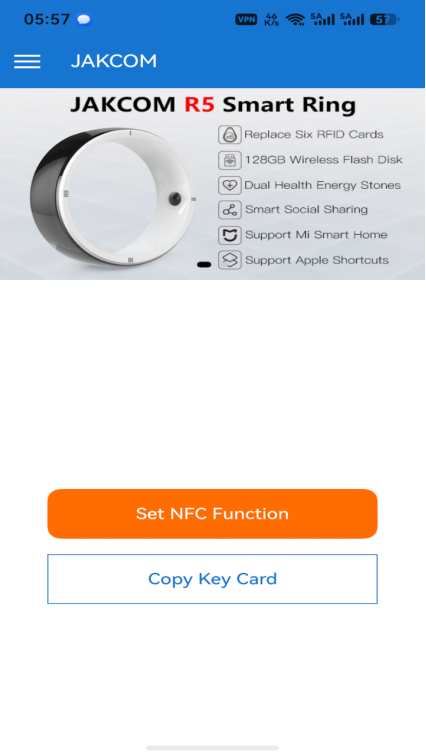
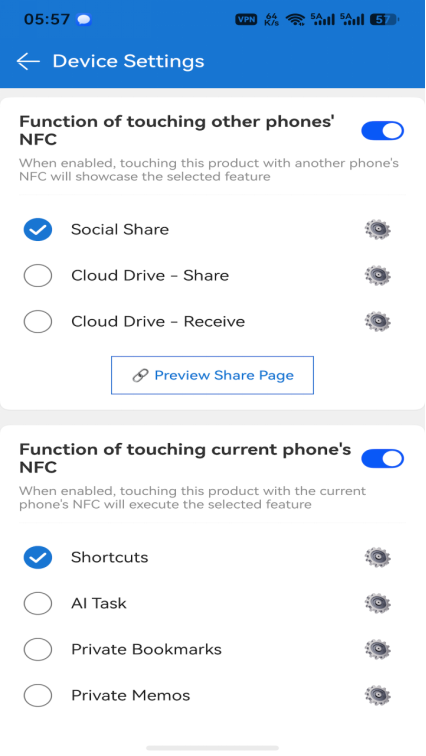
2. Open the APP, tap "Set NFC Function", then follow the prompts to touch the ring's NFC module to your phone's NFC sensing area to access the setup page.
The NFC sensing area is usually located on the non-metal area on the back of the phone.
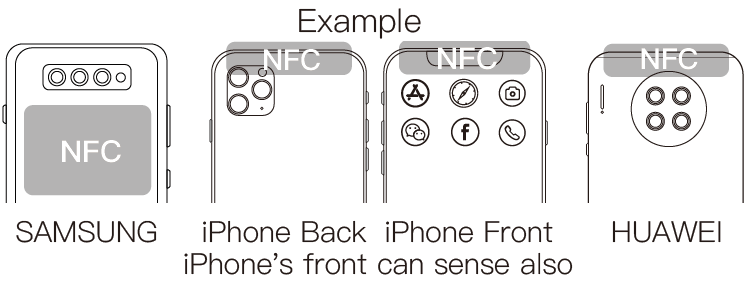
Note:
- Generally, the NFC function of the phone can only be enabled after the screen is unlocked;
- Some phone cases may affect NFC signals. If your phone cannot read the ring, please remove the case and try again.
3. After the setup is complete, touching the phone's NFC sensing area again with the ring's NFC module will activate the corresponding function.
Third-Party NFC App Instructions
The ring's NFC module can be treated as a standard NFC tag and used with any third-party NFC application,
such as: Mi Home's NFC stickers, Apple Shortcuts automation, Amazon Alexa, Huawei Share, Nintendo Amiibo, etc.
Precautions
1. Do not use third-party NFC software to set write protection and lock the ring, or you will lose after-sales service coverage.
2. Any non-human-caused malfunction under normal use is covered by a one-year free warranty.
3. This product is made of ceramic with good scratch resistance, but it cannot withstand heavy impact or drops. Please handle with care.
Contact details